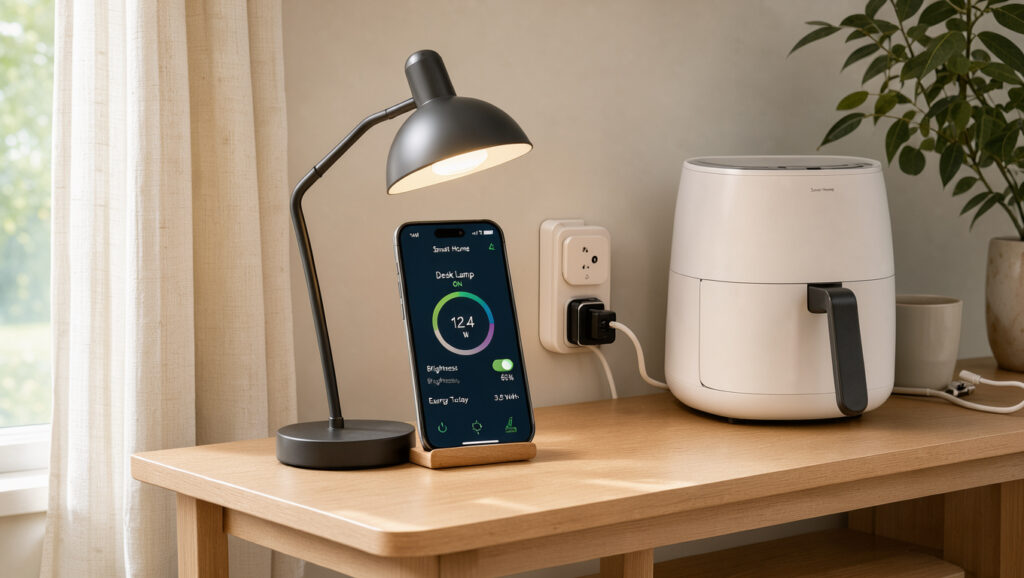
What Is a Smart Plug? How It Works, Limits, and Setup
Most people first notice a smart plug when a lamp clicks on at dusk and nobody touched a switch, but the device behind that trick has a hard ceiling: it switches power to whatever is plugged into it, and no more. Best Buy’s consumer guide describes it as a small Wi-Fi-enabled adapter that controls electricity to connected devices.
Core function: switches power to one plugged-in load (LandGadget buying guide) · Connection types: Wi-Fi, Bluetooth, Zigbee, Matter over Wi-Fi or Thread (LandGadget) · Common US outlet rating: 120 V, 15 A (LandGadget) · Wi-Fi plug definition: small Wi-Fi-enabled adapter that plugs into a wall outlet (Best Buy)
Quick snapshot
- A smart plug is a small Wi-Fi-enabled adapter that controls electricity to connected devices (Best Buy)
- Wi-Fi plugs without a hub connect straight to the router (Best Buy)
- Standby draw of roughly 1–2 W varies by model (according to TechnoWifi’s operation guide)
- Whether schedules run when the internet drops, where sources conflict (according to DHgate Tech selection guide and HomeThru product roundup)
- Best Buy’s explainer carries a publication date of 2022-11-15 (Best Buy)
- Several sources in this review lack publication dates, so their currency cannot be checked
- Matter-certified plugs work with Apple Home, Google Home, Alexa and SmartThings (according to LandGadget) (MyGadgetDad UK consumer guide)
- Check the rated limit on the plug before connecting any appliance (according to MyGadgetDad UK consumer guide)
Across the basics, one pattern holds: the hardware is simple and its electrical limits are fixed, while the control layer changes from brand to brand.
| Fact | Detail |
|---|---|
| Definition | Small Wi-Fi-enabled adapter that controls electricity to connected devices (Best Buy) |
| Control methods | App, voice assistant, schedule (Meteor Electrical’s explainer) |
| Connection types | Wi-Fi, Bluetooth, Zigbee, Matter over Wi-Fi or Thread (LandGadget) |
| Hub requirement | Wi-Fi plugs connect directly to the router; hub-based models need a gateway (Best Buy) |
| Matter compatibility | Works with Apple Home, Google Home, Alexa and SmartThings (LandGadget) |
| Common US outlet rating | 120 V, 15 A (LandGadget) |
| Idle power draw | 1–2 W for Wi-Fi models (TechnoWifi) |
| Energy monitoring | Estimates from voltage, current and power factor (MyGadgetDad) |
How does a smart plug operate?
A smart plug sits between the wall and the appliance. According to Meteor Electrical, it holds a relay, which is an electrically operated switch, along with a small power supply and a wireless radio.
When a command arrives from the app or a voice assistant, the relay opens or closes the circuit. The appliance itself is left untouched, so the plug can only cut and restore its power.
How do smart plugs work with Alexa?
- Matter-certified plugs work with Alexa, Apple Home, Google Home and SmartThings, according to LandGadget.
- Non-Matter plugs start with the manufacturer’s own app, which you install before pairing, as Best Buy outlines.
- DHgate Tech reports that timers run from the plug itself while it has power and sees the Wi-Fi network.
A smart plug does not make an appliance smart. It gives a plain appliance a remote switch, so the appliance’s own behaviour after a power cut matters as much as the app, since LandGadget says a plug “only cuts and restores power.”
The catch: voice control depends on the ecosystem a plug supports, not on the plug alone, so check Matter support before you buy for a voice-first home.
Do smart plugs need Wi-Fi?
Not always. Wi-Fi models join the home router directly, while Bluetooth and hub-based models depend on something nearby. Best Buy explains that hub-based models rely on a gateway device to bridge the router and the plug.
Band matters too. According to Joybuy’s buying guide, many plugs support only the 2.4 GHz band and fail to pair when the phone sits on a 5 GHz-only network.
Can a Bluetooth smart plug work without Wi-Fi?
- Bluetooth plugs respond only when the phone is close. Screwfix hardware retailer guide states they can only be controlled when at home, while Wi-Fi plugs work from anywhere with an internet connection.
- HomeThru reports that some Bluetooth models can operate locally when the internet is down.
- Wi-Fi plugs need no hub but add traffic to the router, while Zigbee and Thread plugs act as mesh routers and typically need a hub, according to LandGadget.
The trade-off: Wi-Fi buys remote control and adds load to your network, while Bluetooth keeps traffic off the router and ends remote control at the edge of the room.
How do I activate my smart plug?
Setup follows the same sequence on most Wi-Fi models, and Best Buy describes it in four steps.
- Plug the smart plug into a wall outlet and wait for its indicator to flash, which signals pairing mode (Best Buy).
- Install the manufacturer’s app and create an account.
- Follow the app prompts to pair the plug.
- Connect the plug to a 2.4 GHz Wi-Fi network through the app.
A phone on a 5 GHz-only network can stop pairing cold. Switch the phone to the 2.4 GHz network before you start, as Joybuy advises.
The implication: when pairing fails, check the Wi-Fi band before you return the plug, because the band is the first thing the sources flag.
What should you not plug into a smart plug?
The short answer is anything whose peak draw exceeds the plug’s rating, plus anything that needs direct wiring or a physical button press.
- MyGadgetDad notes that the rating must exceed the appliance’s maximum draw, not just its average draw.
- Fridges, pumps and air conditioners draw a surge at start-up, and according to LandGadget, the separate motor or inductive rating in the manual should be used.
Six figures settle most load questions, and they split between 120 V and 230 V supplies.
| Specification | Value | Source |
|---|---|---|
| Bluetooth control range | Local only, near the plug | Screwfix |
| Wi-Fi band for most plugs | 2.4 GHz | Joybuy |
| 120 V, 15 A plug | approx. 1,800 W | TechnoWifi |
| 230 V, 10 A plug | approx. 2,300 W | LandGadget |
| 230 V, 16 A plug | approx. 3,680 W | LandGadget |
| UK 13 A socket at 230 V | approx. 2,990 W | Meteor Electrical |
What should I plug into a smart plug?
- Devices that restart by themselves when power returns suit the plug best, according to LandGadget.
- Heating appliances such as kettles, irons, fan heaters and tumble dryers are poor fits, because their peak draw can approach or exceed 13 A (MyGadgetDad).
- Check the rating printed on the plug against the appliance’s maximum draw before you connect it.
A schedule does not check the load. According to Joybuy’s guide, a smart plug is an adaptor, not a replacement for fixed wiring, and its limits must not be exceeded however it is switched.
The trade-off: convenience stops where peak draw starts, so the rating check belongs before the schedule, not after it.
Is a smart plug worth it?
It depends on what you want remote control for. For lamps and small appliances the gains are clear, while for heavy loads the plug adds a control layer on top of a fixed limit.
Do smart plugs waste electricity?
- A Wi-Fi plug draws roughly 1–2 W at idle to keep its radio listening for commands, according to TechnoWifi.
- Standby draw varies by model, so no single figure covers every plug.
- Energy monitoring estimates use by measuring voltage, current and power factor, and can show usage history in the app, according to MyGadgetDad.
What this means: the plug’s own idle draw is the smaller number. The bigger question is what the appliance behind it draws when it runs.
What are the disadvantages of smart plugs?
- Fixed electrical limits that a schedule cannot override, per Joybuy.
- Remote control and voice commands, according to HomeThru, depend on an active internet connection for most Wi-Fi plugs.
- Bluetooth models stop at the edge of the room, according to Screwfix.
Upsides
- Control from anywhere when the plug is on Wi-Fi with internet access, per Screwfix.
- Matter-certified plugs work across Apple Home, Google Home, Alexa and SmartThings, according to LandGadget.
- DHgate Tech reports that schedules keep running on the plug while it has power and sees the network.
Downsides
- Idle draw of 1–2 W on Wi-Fi models, according to TechnoWifi.
- Heating appliances and motor loads push against rated limits, per MyGadgetDad.
- Joybuy’s French buying guide reports that a dual-socket plug’s maximum rating often applies to both outlets combined.
Confirmed facts
- A smart plug is a Wi-Fi-enabled adapter that controls electricity to connected devices (Best Buy).
- Wi-Fi plugs without a hub connect straight to the router (Best Buy).
What’s unclear
- Standby draw varies by model, and one guide’s 1–2 W figure is not a standard (TechnoWifi).
- Whether schedules run offline: DHgate Tech says yes, HomeThru says most Wi-Fi plugs need internet.
- Whether some Bluetooth models run locally when the internet is down (HomeThru).
- No standards-body source was available for load ratings, so the figures above come from retail and consumer guides.
The implication: the most useful number on any plug is its rated limit, and the sources are firmer on that than on anything about the network.
“A smart plug is an adaptor plug, not a replacement for fixed electrical wiring. These limits must not be exceeded.”
— Joybuy, retail buying guide editorial
“Bluetooth smart plugs can only be controlled when at home; Wi-Fi smart plugs can be controlled from anywhere as long as there is an internet connection.”
— Screwfix, hardware retailer guide
“The plug’s rating must exceed the appliance’s maximum draw, not just its average draw.”
— MyGadgetDad, consumer tech guide
A smart plug is a modest piece of hardware: it switches one load on command and leaves the electrical limits where they were. The useful question is not whether the plug is smart but whether the appliance behind it fits the rating printed on the plug. A US buyer who schedules a heater onto a 15 A plug without checking the rating ignores the one limit that no schedule can override.
Related reading: best apps for productivity · best CRM software for small business
joybuy.de, joybuy.fr, joybuy.de, themplsegotist.com, tech.dhgate.com, uk.rs-online.com, m.joybuy.de
Frequently asked questions
What is a smart plug used for?
It switches a plugged-in lamp, fan or similar device on and off from an app, a voice assistant or a timer. The control path changes, while the wiring does not, as Meteor Electrical explains.
Can I plug my TV into a smart plug?
Check the TV’s rated draw against the plug’s rating first. None of the sources here confirm compatibility for a specific TV model, and heating appliances are the ones to keep off the plug, according to MyGadgetDad.
What is a Wi-Fi smart plug?
It is a small Wi-Fi-enabled power adapter that plugs into a wall outlet and controls the electricity reaching the device connected to it, as Best Buy defines it.
Do scheduled actions still run when the internet drops?
The sources conflict. According to DHgate Tech, schedules keep running on the plug while it has power and sees the Wi-Fi network, while HomeThru says most Wi-Fi plugs need internet access for scheduling.
Does a Matter smart plug work with Alexa and Google Home?
According to LandGadget, Matter-certified plugs integrate with Apple Home, Google Home, Alexa and SmartThings, so you are not locked into one app.
More related posts
 Bed Bath and Beyond Rotorua: Catalogue, Furniture, Sale
 DOC Campground vs Holiday Park: Which Is Right for You
 Old Hotmail Sign In – Access Your Legacy Account Guide
 How Is Plastic Made? Step-by-Step Guide to Plastic Manufacturing
 German Shepherd Puppies NZ: Prices, Breeders & Guide
 Ottoman Turkish Restaurant Menu: Dishes & Structure
 P&O Cruise Control: Manage Booking, Drinks & Cancellations
 City Fitness Cancel Membership: Avoid Fees & Steps